CLI reference
Every command accepts --help. Commands marked (stub) are not implemented
yet: they exit 1 with a "not implemented yet" message. Agent-friendly commands
accept --json and emit exactly one JSON object on stdout.
Exit codes: 0 ok, 1 unexpected, 2 usage, 3 config/credentials,
4 synthesis failed after retries, 5 quality gate failed, 6 structural
lint errors (render refuses unless --force), 130 interrupted by Ctrl-C.
sase listen program name
Under the command plugin (sase plugin install listen), every example on
this page reads sase listen … instead of sase-listen …: usage lines,
error prefixes, epilogs, and "run this next" hints all name the invoked
binary. Version strings, install paths, and the SSH wire command keep the
sase-listen distribution name. Path-like arguments (render/script
source, lint script, --cover, -o/--output, -H/--html, --source,
audition --text) carry sase_completion = "path" for shell completion.
Live progress
render (and the other network-bound commands) always show what you are
waiting for: a live stage checklist with sub-steps, chunk progress, ETAs,
and retry countdowns.
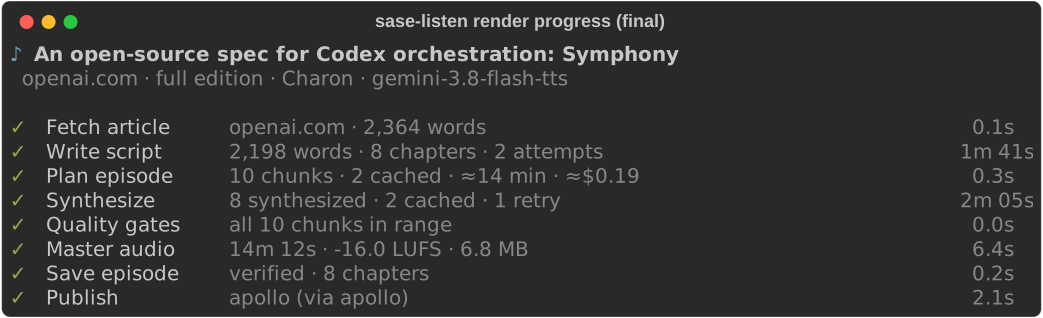
Each row is one stage: Fetch article (or Read ref / Read file), Write
script, Plan episode, Synthesize, Quality gates, Master audio, Save
episode, Publish. The active row shows the current step in plain English
(attempt 2 of 3 · fixing 2 lint findings · waiting on
gemini-3.1-pro-preview); upcoming stages stay visible as dim pending rows.
Synthesize shows a progress bar (done/total), one row per in-flight
chunk with its chapter title, live retry countdowns
(retry 1 of 4 in 14s · rate-limited), and a queued count. Completed rows
collapse to a ✓ line with a summary and duration.
The ETA appears after the first chunk finishes and is deliberately coarse (rounded to 5 s under a minute, whole minutes above) so it never jitters. Treat it as a rough guide, not a promise: it assumes the remaining chunks take as long as the finished ones.
sase-listen render SOURCE [--progress {auto,live,plain,off}]
sase-listen script https://example.com/article [--progress {auto,live,plain,off}]
--progress auto (the default) picks the live checklist on a TTY and
plain lines otherwise; --json always disables progress. live forces
the checklist (useful under script(1)), plain forces line-oriented
stderr with no ANSI escapes, and off silences progress entirely (the
finished checklist still prints to stdout as part of the summary).
Ctrl-C stops promptly: the first press finishes in-flight chunks so they stay cached, then exits 130 with a hint about how to resume; a second press quits immediately without waiting for the cache writes.
render — Markdown in, MP3 out
sase-listen render SOURCE [-o OUT.mp3] [-n NARRATOR] [--voice VOICE]
  [--cover IMG | -g/--generated-cover] [--dry-run] [-e {brief,full,verbatim}]
  [--html FILE] [--refresh] [--publish | --no-publish] [--no-cache] [--force]
  [--progress {auto,live,plain,off}] [--json]
SOURCE is a narration script, a plain Markdown file (normalized
automatically), a local PDF file, or a kind:path artifact ref (fetched
through audited sase artifact read), or an http(s) article or PDF URL. URL
and PDF rendering defaults to the AI-written brief edition; choose full
for an adaptation or verbatim for a deterministic article-text reading.
--html FILE uses a saved browser page (HTML or PDF), and --refresh
fetches or extracts the source again and replaces the cached copy. arXiv
paper URLs (for example /abs/…) are fetched as the paper's PDF; see
Web articles.
--dry-run writes the article script if needed, prints the chunk plan, and
stops.
--publish / --no-publish override the feed.auto_publish config.
--cover IMG uses explicitly chosen artwork; -g / --generated-cover
generates the title card and ignores cover frontmatter and any sibling
<stem>_infographic.png. The two cover options are mutually exclusive.
See Reliability for gates, cache, and manifests.
script — normalize Markdown to a script
sase-listen script SOURCE [-o notes_narration.md] [-e {brief,full,verbatim}]
  [--html FILE] [--refresh] [--progress {auto,live,plain,off}] [--json]
For Markdown files, produces an edition: verbatim, producer: deterministic
script plus an omissions report. For article URLs, defaults to an AI-written
brief script; --edition full writes a full adaptation, and verbatim selects
deterministic normalization. SOURCE can be a Markdown file, a PDF file, or an http(s)
article or PDF URL. For URL and PDF behavior and cached source storage,
see Web articles and Narration scripts.
lint — validate a script
sase-listen lint episode_narration.md [--source report.md] [--strict] [--json]
Exits 1 on errors, or on warnings with --strict. --source adds the
number-fidelity check: every number in the script must appear in the source.
A source number may appear as digits or spelled out in words: "thirteen"
matches 13, and "fifty percent" matches 50%.
guide — print the authoring rules
sase-listen guide [--edition {brief,full}]
Prints the packaged rules hand-written scripts must follow (brief by
default; pass --edition full for the full-length edition). The rules ship
in the package so they never drift from the code that enforces them.
audition — compare voices (stub)
sase-listen audition [--voices Charon,Kore] [-n NARRATOR] [--text FILE] [--json]
Intended: render the sample passage once per voice for comparison. Not implemented yet (owner: cli phase follow-up).
ls — list episodes (stub)
sase-listen ls [EPISODE] [--json]
Intended: list library episodes, or show one episode's manifest. Not
implemented yet (owner: cli phase follow-up). Meanwhile, episodes live under
$XDG_DATA_HOME/sase-listen/library/<slug>-<hash>/ with manifest.json.
doctor — check the setup
sase-listen doctor [--online] [--json]
Checks config load, ffmpeg resolution, credential presence, writable
directories, install freshness (install), the exact build (version,
for example 0.1.1 (editable @ 3ae7310)), and feed configuration
(feed:host shows the host build; feed:host-build fails on renderer /
host drift). --version prints sase-listen <build>. --online is
intended to add a one-word live synthesis check; it is a stub today
and reports FAIL: credentials (online check not implemented yet).
cache — inspect the chunk cache (stub)
sase-listen cache [prune] [--all] [--older-than 30d] [--json]
Intended: show cache stats and prune entries. Not implemented yet (owner: cli
phase follow-up). The cache itself works — render reads and writes it; only
the inspection command is missing. --no-cache on render bypasses it.
config — show or start configuration
sase-listen config [--json]
sase-listen config init     # write a starter file
sase-listen config path     # print the config path
Output annotates every value with its origin (default, env, file).
Secrets never appear. See Configuration.
feed, publish, unpublish — the podcast feed
sase-listen feed [init|prune|rebuild|receive] [--base-url URL] [--json]
  [--print] [--qr] [--show-url]
sase-listen publish EPISODE|--latest|--pending [--json] [--show-url]
sase-listen unpublish EPISODE [--json]
EPISODE is an episode id, an episode MP3 path, or --latest.
--pending flushes the retry outbox. feed receive EPISODE_ID --json
is the internal host-only transport (stdin tar); do not call it by
hand. publish supersedes same-title feed episodes (feed copies only;
the library is kept) and reports superseded/replaced in --json.
See Podcast feed and
Multi-machine publish.
Non-TTY and NO_COLOR behavior
--progress auto (the default) is off with --json, live when stderr
is a terminal and TERM is not dumb, and plain otherwise. NO_COLOR
only removes color: the live checklist still renders and animates, just
without color. Plain mode writes line-oriented text to stderr with no ANSI
escapes and no carriage returns, so it is safe to pipe and log. --json
always emits exactly one JSON object on stdout with empty stderr,
regardless of TTY state, for agent consumption.